Before AI Can Act, Someone Has to Decide What It’s Allowed to Do
In a recent post we argued that AI can’t run what it can’t reach, and that connecting your systems is the first real AI project. A companion post covers the second prerequisite: clean data, because AI acts on whatever it finds. This one covers the third. Once AI can reach your systems and the data is worth trusting, someone has to decide what it’s allowed to do there.
That’s governance. The word sounds like a binder of policies nobody reads. For a small business it’s really four decisions, and most owners are already making them by default, without knowing it.
Governance is happening whether you plan it or not
Your team is already using AI. Someone pastes a client email into a free chatbot to draft a reply. Someone uploads a spreadsheet to get a summary. Someone connects an AI note-taker to their calendar. Each of those is a governance decision, made by an individual, on the spot, with whatever judgment they had that day.
None of it is malicious. Most of it is people trying to work faster. But it means client data is flowing into tools you’ve never vetted, under terms nobody read, with no record of what went where. The choice isn’t between governance and no governance. It’s between decisions you made on purpose and decisions made for you.
Decision one: which tools are allowed
Start with a short approved list. Business-grade AI tools like Microsoft 365 Copilot run inside your existing tenant, respect your existing permissions, and don’t train on your data. Free consumer tools generally offer none of those promises. We covered that difference in AI Without Governance Is a Risk.
The point of an approved list isn’t to ban things. It’s to give people a fast, safe default so they stop reaching for whatever’s free. Pair it with a simple way to request a new tool, and an honest answer within a few days.
Decision two: what data can go where
Not all data carries the same risk. A useful split for most small businesses is three buckets. Public information, like your website copy, can go anywhere. Internal information, like pricing, procedures, and project details, stays in approved business tools. Confidential and regulated information, like client financials, health records, legal matters, and anything covered by a contract or a regulation, only touches systems that are specifically approved for it, with access limited to the people and automations that need it.
For firms in legal, healthcare, or financial services, this isn’t optional. Your obligations to clients and regulators don’t pause because the tool is new. If you can’t say where a client’s data went, you have a compliance problem whether or not anything bad happened.
Decision three: what AI can do without asking
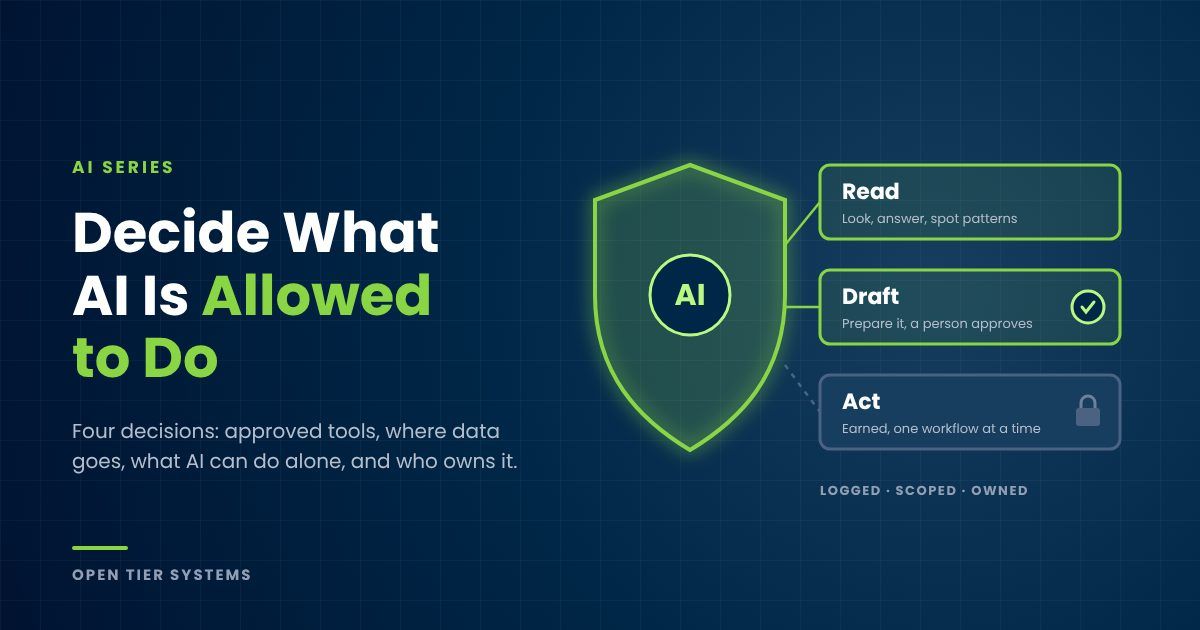
This is the decision that matters most once automations are connected to your systems, and the cleanest way to make it is in three tiers.
Read. AI can look at data to answer questions and spot patterns. Low risk, provided it can only see what it’s supposed to see.
Draft. AI can prepare something, a reminder email, a time entry, a report, but a person reviews it before it goes anywhere. This is where most automations should live at first.
Act. AI can do the thing on its own: send the message, post the entry, update the record. This tier is earned, one workflow at a time, after the draft tier has proven itself and the stakes are low enough that a rare mistake is cheap to fix.
Every automation we’ve shown in this series has a person tapping yes before anything touches a customer or a ledger. That isn’t caution for its own sake. It’s how a team learns to trust the system, and trust is what lets you move workflows up a tier later.
Decision four: who’s accountable, and how you’d know
Every automation needs a named owner, a person responsible for whether it’s working and whether it’s still doing what the business needs. It needs its own credentials, scoped to exactly what it touches, instead of borrowing an admin login that can do anything. And every read and every action needs to be logged, so that when someone asks what happened, the answer is a lookup instead of a guess.
Done this way, you have more visibility into what your automations do than you have today into what an employee with a login does. That’s not a high bar, but it surprises people.
Governance makes AI faster, not slower
The instinct is that rules slow things down. In practice it runs the other way. Businesses without governance stall the first time something goes sideways, because nobody can say what the AI was allowed to do or what it actually did, so the safe move is to turn everything off. Businesses with governance fix the one workflow, check the log, and keep going. Clear rules are what let you say yes to the next automation with confidence.
A one-page starting point
You don’t need a thick policy to start. You need one page that answers four questions: which AI tools are approved, which kinds of data can go into them, which automations can act on their own versus draft for review, and who owns each one. Write it down, share it with the team, and revisit it every quarter. That page will do more good than any binder.
Where we come in
Governance is built into AI Managed Services from day one. Every automation we build has scoped credentials, approval gates, logging, and an owner, and our AI Business Assessment includes a review of the AI tools your team is already using and where your data is going today. For clients with regulatory exposure, our compliance work ties AI use back to the frameworks you’re already held to.
Access, clean data, and governance. Get all three right and AI becomes something you can build on instead of something you have to watch. Early Access assessments are limited each quarter.
About The Author