AI Can’t Run What It Can’t Reach
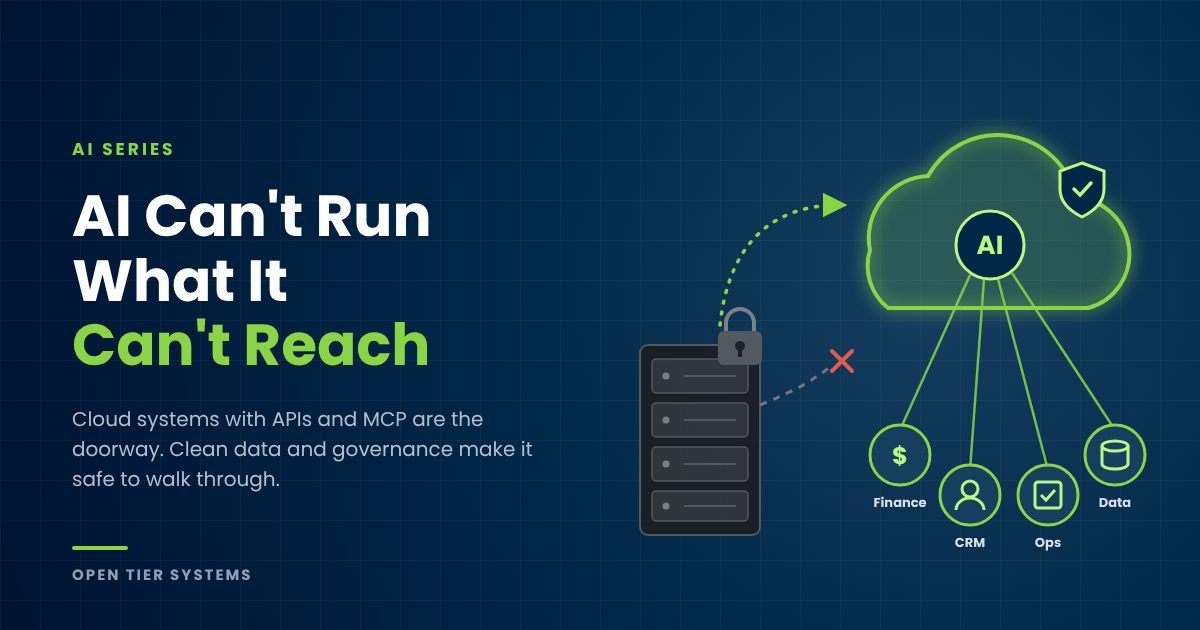
Most small businesses have tried AI by now. Someone used ChatGPT or Copilot to write an email or summarize a document. Useful, and nowhere near the point, because that AI knows nothing about your business. It can’t see your open invoices, your project schedule, your tickets, or your customer history. It’s a brilliant new hire you’ve locked out of every system in the building and asked to help from the parking lot.
The automations that actually change how a business runs, like the collections engine, time capture pipeline, and content system we run at OTS, don’t work because AI got smarter. They work because AI was given access. That’s the prerequisite nobody selling you an AI subscription mentions, and for a lot of businesses it forces a decision they’ve been putting off for years.
Your business already runs on systems. Can they talk?
Every business past about ten people runs on the same skeleton: something for money (QuickBooks, an ERP), something for customers (a CRM), something for the work (a PSA, project or job management), and something for communication (Microsoft 365 or Google). Who owes you, what’s late, who’s profitable, and where the hours went all live in those systems.
Some of them expose that data through an API, a doorway other software can use to read data and take actions, with permission. Others trap everything behind a login screen where only a human clicking buttons can reach it.
That used to be an IT detail. Now it decides whether AI can do anything meaningful for you. AI can only chase overdue invoices if it can see them. It can only log billable time if it can write to your PSA. No doorway, no automation.
MCP: the standard plug
Until recently, connecting AI to a business system meant custom integration work for every connection. We’ve built plenty of them. Each one was its own project.
MCP, the Model Context Protocol, changes that. It’s a standard plug for AI. A system that speaks MCP can connect to an AI assistant directly, with controls over exactly what the AI can see and do. Think of what USB did for hardware: before it, every device needed its own cable and driver. After it, things just connected.
The major software vendors are adopting it now. Watch where they’re doing it, though, because that’s the real story.
The doorways are being built in the cloud
Every serious API and every MCP connector shipping today is being built for cloud software. Not the accounting package installed on the server in your back closet. Not the job management database a consultant set up in 2012. Not the line-of-business app you reach over a VPN.
That isn’t an accident. A cloud system already lives on the internet, already has modern sign-in, and already gets updated by the vendor every few weeks. Adding an API and an MCP connector is a natural next step. An on-premises system lives behind your firewall, runs whatever version you last installed, and was designed for one person at one keyboard. Connecting AI to it ranges from fragile workarounds to flat impossible.
Look at what the vendors are doing with their own money. Intuit stopped selling new QuickBooks Desktop Pro, Premier, and Mac subscriptions in September 2024 and hasn’t released a new Desktop version since. The development, AI features included, goes to QuickBooks Online. That pattern is repeating across nearly every category of small business software. The vendor’s roadmap is moving to the cloud whether or not you do.
If your core systems are on-premises, you aren’t standing still while you wait. You’re falling behind every competitor whose systems are already connectable, and the gap widens every month, because the AI improvements land on their side of the line and not yours. Staying put isn’t the safe, cheap option. It’s a recurring tax you pay in automations you can’t run.
And a migration done now pays off in a way it didn’t five years ago. Moving to the cloud used to buy you remote access and fewer server headaches. Today it also buys you every AI capability your vendor ships from here on, with no integration project on your end.
What to demand from every system you keep or buy
When you’re choosing what to migrate to, or deciding whether a current system stays, hold it to four questions. Does it have a documented API that can both read and write, not just export reports? Does it offer an MCP connector today, or have one on a published roadmap? Is API access included in the tier you’re paying for, rather than locked behind an enterprise upsell? And does it support scoped access, so you can grant an automation exactly the permissions it needs and nothing more?
A system that fails those questions is a dead end, no matter how comfortable your team is with it. Comfort is real, and migrations are work. But the cost of a migration is paid once. The cost of a system AI can’t reach is paid every month, for as long as you keep it.
Access is one of three prerequisites, not the only one
Getting AI into your systems is necessary. It isn’t sufficient. Two other things decide whether that access produces value or produces mess, and they’re big enough that each gets its own post, on data hygiene and governance. You should know them now, though, because they belong in the same plan.
Data hygiene. AI doesn’t fix bad data. It acts on it, at speed. If the same customer exists three times under three spellings, if job codes mean different things to different people, if half your contacts have no email, a connected AI will chase the wrong invoice, misreport profitability, and do it confidently. A human working one record at a time catches those problems. An automation working ten thousand records doesn’t. Clean, consistent data is what turns access into answers you can trust.
Governance. Once AI can reach your systems, someone has to decide what it’s allowed to do there. Done right, access is scoped, so an automation can read invoice statuses without being able to delete records. Actions that matter route through human approval, so a person taps yes before anything touches a customer or a ledger. Everything’s logged, so you can review every read and every action after the fact. Add clear policy on which AI tools staff can use and what data can go into them, and you end up with more control than you have today over an employee with a login.
Here’s why this matters for the cloud decision: a migration is the cheapest moment you’ll ever get to fix both. You’re already moving the data, so you clean it on the way over instead of carrying ten years of duplicates into the new system. You’re already setting up the new platform, so you design permissions and approval rules from scratch instead of retrofitting them later. Do the move without the hygiene and governance work and you’ve built a fast, well-connected way to make mistakes.
Where this leads: your data in one place
With all three in place, a bigger payoff opens up. The questions owners actually ask usually span systems. “Which customers are profitable once you count the service hours we sink into them?” Revenue’s in accounting, hours are in your PSA, relationship history is in your CRM. Answering it by hand means three exports and an afternoon in Excel, which is why it gets asked once a year instead of every week.
The fix is a data lake. It sounds enterprise and isn’t: a central store where copies of your key data from every system land automatically. Once it exists, AI can answer cross-system questions in seconds and catch patterns no single app can see, like the client whose ticket volume is climbing while their contract value isn’t. It only works if every system has a doorway, the data coming through is clean, and the access is governed. Skip any one and the lake fills with problems instead of answers.
Stop thinking in projects
Most businesses buy automation like anything else: one project, one price, one payback. That math is fine, but it misses the real asset. The first automation carries the cost of building the doorways. Every one after that walks through doorways that already exist.
Our collections engine required wiring into our PSA and billing. The time capture pipeline reused that wiring. Each build gets cheaper and faster than the last, because the connective layer is the investment and the automations are the dividends.
So the strategic question isn’t “which AI tool should we buy?” It’s “can AI reach my systems and data, safely, with permissions I control?” If the honest answer is “not until we move off the server in the closet,” then the migration is your first AI project. Treat it that way and budget for it that way, hygiene and governance included.
Where we come in
This is the layer of our AI Managed Services most clients don’t know to ask for, and it’s the most valuable thing we build. We start by grading every system you run against the four questions above: which are ready, which have a path, and which are dead ends. For the dead ends, we plan and run the move to a connectable cloud platform, cleaning the data on the way and setting up permissions, approvals, and logging before any automation goes live. Then we build the connective layer once, so every automation in your package, and every one you add later, plugs into it.
Twenty years of migrating and integrating business systems turns out to be the right resume for this moment. The AI is new. The plumbing discipline isn’t.
Want to know where your business stands? Our AI Business Assessment starts with exactly this: whether your systems can be reached, whether your data is clean enough to trust, and whether the controls are in place to let AI act on it. Some owners find out they’re one connection away. Some find out their core system is a dead end, and knowing that before you sink another year into it is worth the assessment by itself. Early Access, limited spots per quarter.
About The Author